Producing more creative assets with AI is easy to imagine; keeping them useful, original, and on-brand as volume grows is the hard part. Designing orchestrated agent pipelines for creative production means assigning repeatable tasks to AI agents while giving people clear control over direction, selection, rights, and publication.
For an affiliate marketer or home-based entrepreneur, that could mean turning one approved campaign brief into researched outlines, draft emails, social variations, and an editing checklist without asking one chatbot to invent an entire campaign. The goal is not to remove the creator. It is to make the workflow visible enough that you can delegate the repetitive work, catch mistakes before they spread, and spend more time making decisions your audience will notice.
What are orchestrated agent pipelines for creative production?
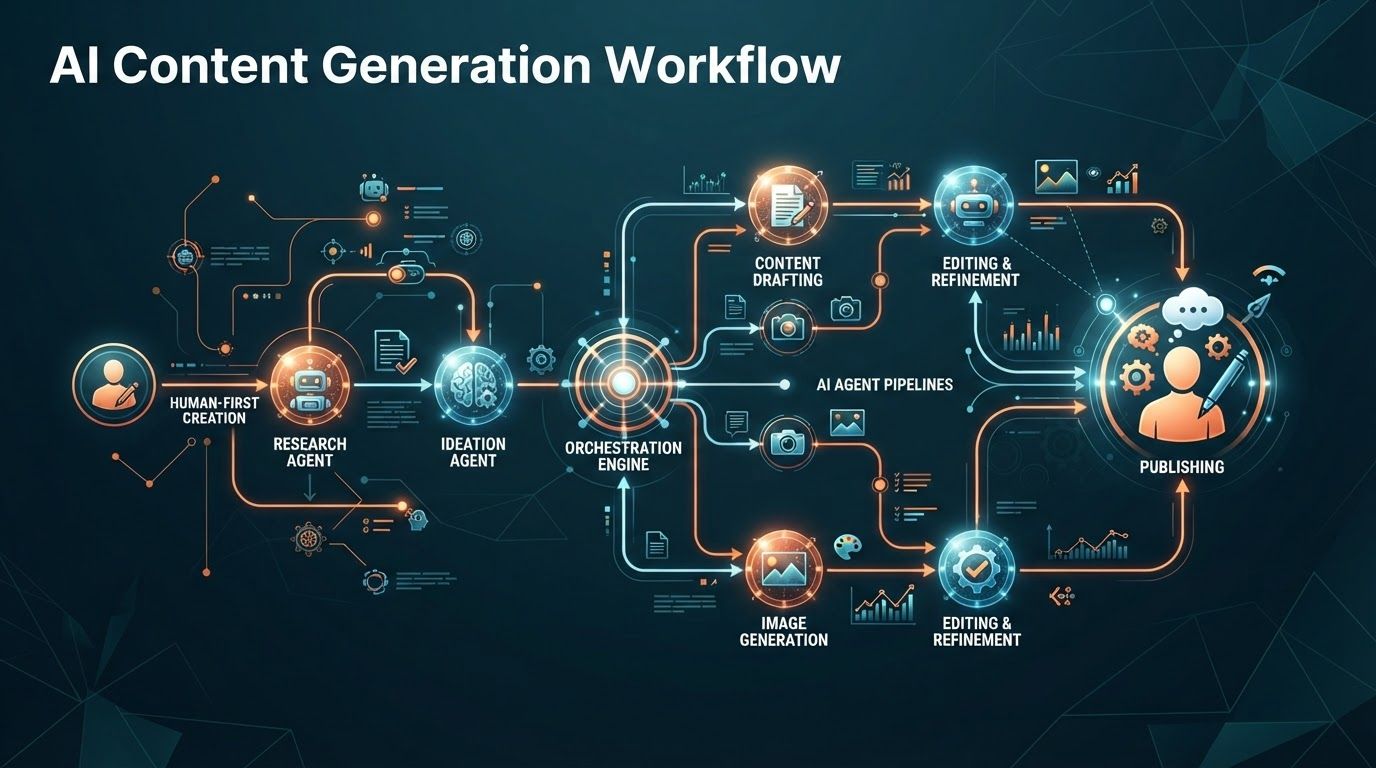
An orchestrated agent pipeline is a sequence of defined tasks in which AI agents receive inputs, produce specified outputs, and pass work through checks or human approvals before the next step. In a human-first creative pipeline, agents can research, organize, draft, adapt, and test ideas, but a person remains responsible for creative direction, factual claims, rights, and the final release.
The word orchestrated matters. Asking a chatbot to “write this week’s content” gives it a broad goal but few boundaries. An orchestrated workflow instead specifies where the brief comes from, which source materials an agent may use, what each step must deliver, who reviews the result, and what happens if it fails a check.
Imagine a campaign for a product you promote as an affiliate. One agent organizes approved product details and audience questions. Another proposes article angles based on that material. A drafting agent writes to an approved outline, while a separate reviewer flags unsupported claims, missing disclosures, and inconsistent messaging. You choose the angle, edit the piece, verify its claims and links, and authorize publication. That is a pipeline; it is not an instruction to let several bots talk until they produce something plausible.
There is a broader reason to take this approach seriously. OpenAI describes leading organizations as moving from chat-based assistance toward delegated work with agents. It reports that frontier firms use 3.5 times as much intelligence per worker as typical firms, with the biggest gap associated with richer, more complex AI use. Its engineering-focused data also shows frontier firms sending 16 times as many Codex messages per worker. Those observations suggest that structured delegation is becoming an operational capability, but coding activity is not a forecast of what a solo creator will earn or publish.
Creative research points toward a similarly practical, rather than fully automated, future. Adobe’s research on working creatives found AI entering particular parts of their workflows while people maintained boundaries around humanity and ownership. McKinsey includes creative content generation and testing among promising workflow settings for AI. Taken together, those findings support breaking production into useful substeps without handing over authorship or accountability.
Choose creative tasks to automate by starting with the work, not the tools
Before you build an agent, map one piece of work from idea to publication. Choose something you already produce, such as a weekly affiliate article, a welcome-email sequence, or short videos drawn from a longer tutorial. A familiar process gives you examples of good output and makes errors easier to spot.
Write down every handoff: finding audience questions, gathering approved information, selecting an angle, outlining, drafting, editing, making visuals, checking claims, adding disclosures, scheduling, and reviewing performance. Then ask which steps are repetitive, which require judgment, and which could harm trust if automated poorly. This is more useful than shopping for a multi-agent platform before you know what the agents should do.
Sort tasks into three lanes
- Good candidates for delegation: turning approved notes into an outline, formatting a draft for different channels, extracting recurring questions from your own customer messages, and checking whether required sections or links are present. These tasks have inputs and reviewable outputs.
- Good candidates for assisted decisions: proposing angles, comparing line options, suggesting cuts to a script, or spotting gaps in a campaign. An agent can widen your options, but you still choose based on audience fit and experience.
- Human-owned decisions: deciding what you genuinely recommend, approving sensitive claims, interpreting licensing terms, accepting brand risk, and publishing under your name. Tools can prepare evidence for these decisions; they should not silently make them.
This division matches Deloitte’s account of agentic transformation: routine, structured tasks are better candidates for greater autonomy, while creative, strategic, and high-judgment work still needs substantial human oversight. It also helps prevent a common mistake: delegating the work that appears slowest without asking why it is slow. A product comparison may take time because it requires careful evaluation, not because the writing step needs another agent.
For a first pilot, pick a narrow output with frequent repetition and a straightforward way to assess quality. A pipeline that produces three draft email variations from an approved offer brief is easier to control than one that autonomously researches, writes, illustrates, and publishes a full month of content. Start where you can inspect every result, then widen the scope only after the process consistently earns your trust.
McKinsey’s film and TV breakdown offers a useful analogy even for a small business. It separates development and pre-production, physical production, and post-production, with possible AI-supported work such as storyboarding, script breakdowns, editing, tagging, sound, and dubbing. You do not need a studio workflow to borrow the principle: identify the stage, define the deliverable, and place review where mistakes become expensive to fix.
Design the pipeline around briefs, handoffs, and approval gates
A reliable creative pipeline begins with a brief that a person approves. It should tell every participating agent what the asset is meant to accomplish, whom it serves, what claims are allowed, which sources can be used, and what must never be implied. Without this shared brief, separate agents can produce individually polished pieces that contradict one another.
Here is a practical sequence for an affiliate content campaign. It is a design pattern, not a requirement to buy a particular application or run every step as a separate model:
- Set direction: You choose the audience problem, the product or offer, the intended outcome, the channel, and your editorial position. Add approved product information and the disclosure requirements you need to meet.
- Prepare inputs: A research assistant organizes your permitted notes, identifies open questions, and marks facts that still require verification. It does not convert guesses into claims.
- Plan the asset: An outlining agent proposes a structure, key points, and places where firsthand experience would improve the piece. You approve or revise the angle before drafting begins.
- Draft in modules: A writing agent produces the article, email, or script from the approved outline. A repurposing agent can later adapt the approved message for other channels rather than inventing a new offer.
- Validate and review: A checking step compares the output with the brief, source material, brand rules, link requirements, and disclosure checklist. You inspect flagged issues and make the substantive editorial decisions.
- Release and learn: After your final approval, publish through your normal tools. Record corrections, audience questions, and performance observations so the next brief is stronger.
The most important design choice is where the pipeline pauses. An approval after the outline prevents a weak premise from producing five weak drafts. A second approval before publication protects readers from misleading claims, unlicensed creative elements, or an offer that no longer matches the page. If your workflow includes paid promotion, you may also want a sign-off before an asset is activated across channels.
OpenAI’s Symphony illustrates orchestration in a different domain. It uses a project-management board such as Linear as a control plane for coding agents and watches downstream processes such as CI checks, conflicts, and retries. The transferable idea is not that creative work can be validated like code. It is that work needs a visible status, an owner, rules for moving to the next stage, and a way to handle failures rather than quietly passing them along.
In an engineering setting, OpenAI reported a 500% increase in landed pull requests over the first three weeks for some teams using Symphony. Treat that as a context-specific example of throughput when tasks are defined and checks can be automated, not as a promised gain for marketing content. Creative quality is harder to reduce to a passing build, which makes your brief and approval gates more important.
Make each agent handoff specific enough to inspect
“Make it better” is a weak instruction for an agent or a reviewer. A useful handoff says what came in, what should come out, how the output will be checked, and what to do when information is missing. You can capture that in a document, a project card, or an automation tool; the format matters less than the consistency.
Give agents a small, bounded job
Consider the difference between “research the best options for my audience” and “using only these approved product pages and my notes, list the features relevant to beginners; include the source for each feature and mark unanswered questions.” The second instruction limits the material, defines the audience lens, and creates something a human can verify. An agent that cannot find support should return an open question, not fill the gap with confidence.
For each stage, write down four essentials:
- Input: the approved brief, source documents, prior approved draft, or campaign rules the agent may use.
- Task and output: the narrow action required and the shape of the result, such as an outline with source notes or a list of line options with their intended audience angles.
- Acceptance criteria: the checks that must pass, including factual support, format, tone, disclosures, and any channel constraints.
- Escalation rule: the questions that must come back to you, including conflicting sources, unclear permissions, missing product details, or a claim the agent cannot substantiate.
Keep the chain traceable. Give the draft a version, connect it to the approved brief, and retain enough source notes to understand where its key claims came from. If you later adapt the article into an email or video script, use the approved version as the starting point. That reduces the chance that each adaptation drifts further from what you actually meant to say.
It also helps to separate creator and checker roles. A drafting agent can focus on structure and clarity, while a checking step compares its output with a defined checklist. This does not make the checker infallible: an AI reviewer may miss an unsupported claim or flag a correct one. Its purpose is to surface issues for you efficiently, not to grant an automatic certificate of accuracy.
Think about what happens when a stage fails. If an outline lacks evidence for a central claim, send it back for revision or remove the claim. If a draft fails the rights check, stop that asset instead of allowing a downstream repurposing agent to make more versions of it. A pipeline scales both good and bad inputs; explicit stop conditions keep a small error from becoming a campaign-wide one.
Keep human judgment and rights review inside the creative workflow
Human-first does not mean glancing at a finished asset just before it goes live. It means assigning people the decisions that depend on taste, relationships, responsibility, and permission. Adobe identifies selection, comparison, rights review, and collaboration as increasingly important capabilities alongside generation. Those are practical checkpoints, not decorative endorsements at the end of an automated process.
In affiliate marketing, your credibility rests on distinctions an agent cannot establish merely by producing fluent copy. Have you tried the product, or are you summarizing supplied information? Is a benefit supported by an approved source? Would a beginner understand the trade-off? Does the piece clearly disclose the commercial relationship where needed? You must answer those questions based on what you know and the rules that apply to your business.
Put rights checks before reuse and publication
A rights review should cover more than a final image. Ask where each visual, testimonial, music clip, voice, brand element, and substantial piece of source text came from; what permission or license applies; and whether the planned use fits that permission. If a source or permission is unclear, keep the asset out of the publication queue until you resolve it. An agent can assemble a provenance record, but it cannot turn uncertain rights into granted rights.
The same discipline applies to audience information. If you use customer messages to identify questions, decide what information the agent truly needs and remove details that are not necessary for that task. Keep access to briefs, drafts, and customer material appropriate to the tools and collaborators involved. Better input hygiene makes the pipeline easier to trust and review.
Adobe’s research found U.S. creative professional job postings rose 8% between September 2025 and April 2026 as AI skills became more prominent in job requirements. Its broader research argues that creative work is being redistributed rather than fully replaced. For a small creator, the operational lesson is straightforward: develop your ability to direct, evaluate, and refine AI-assisted work instead of treating the number of generated drafts as the measure of your value.
There will be times when you should not automate a segment at all. A deeply personal story, a sensitive recommendation, an unfamiliar product category, or a campaign involving uncertain permissions may be better handled directly by you or a qualified collaborator. The pipeline should make those exceptions easy to recognize, not pressure you to send every idea through the same machine.
Build a lean tool stack before adding more agents
You do not need a complex multi-agent platform to begin. A shared brief, an AI tool, a place to track tasks, and a repeatable review checklist can form a workable pipeline. What matters is whether you can see the current version, the next owner, the approval status, and the reason an item was accepted or returned.
As volume rises, automation can move approved items between stages, alert a reviewer, or create channel-specific draft tasks. Add those connections only when the manual handoff is clear. Automating a vague process generally makes confusion faster: drafts arrive in the wrong place, reviewers do not know which version is current, and no is sure who authorized publication.
Larger organizations are investing in integrated orchestration. Adobe and WPP described a plan to coordinate planning, creation, production, and activation of creative and media assets using AI agents. Adobe and NVIDIA also announced work on AI-powered creation, production, personalization, and agentic workflows across Adobe’s creative and marketing stack. Those efforts show where enterprise tools are ed; they do not mean a solo business needs enterprise infrastructure to benefit from a clear workflow.
The trade-off is between convenience and control. One all-purpose tool may be simple to manage, but it may offer limited visibility into individual decisions. A collection of specialist tools may be more flexible, but moving assets among them creates more opportunities for version errors and permission mistakes. Choose the simplest arrangement that lets you inspect outputs, pause the workflow, and replace a failing step without rebuilding everything.
If other people help with content, define roles even in a tiny team. Deloitte describes a developing model of multi-human, multi-agent pods with domain leads, operators, risk stewards, and specialist creator or validator agents. In a home business, one person may fill several of those human roles. The useful principle is to name the responsibilities: who sets direction, who operates the workflow, who checks risk, and who gives the final yes.
Measure creative pipeline quality, not just output volume
More drafts are not necessarily more useful. A pipeline that produces twice as many assets while creating extra correction work, weakening your voice, or confusing customers has not delivered the kind of scale you want. Decide what success means before you increase production.
Start with a small baseline from your existing process. Record the time it takes to move an asset from approved brief to publishable draft, the number of substantial revisions, common errors, and the work you most often postpone. Then compare the pilot against that baseline while also reading the finished work as your audience would.
- Quality: Are claims supported, instructions clear, and recommendations genuinely useful to the intended reader?
- Editorial effort: How much time do you spend fixing drafts compared with making meaningful creative choices?
- Workflow reliability: Do handoffs arrive with the right sources and versions, and do approval gates catch issues before publication?
- Rights and trust: Can you identify the origin and permissions of reused material, confirm necessary disclosures, and explain why the final asset says what it says?
- Business relevance: Are the assets addressing real audience questions and supporting the goals of the campaign without sacrificing trust for clicks?
Look for patterns rather than judging an agent on one excellent or terrible result. If a drafting step repeatedly needs the same correction, improve its input or narrow its assignment. If a reviewer produces many unhelpful flags, revise the checklist. If everything passes but the content feels generic, revisit the human-approved angle and add specific experience before asking for more variations.
OpenAI recommends measuring depth of use, building governance for production, investing in enablement, scaling what works, and redesigning work around agents rather than placing a chat interface on top of old processes. Deloitte’s findings explain why that advice matters: in its 2026 analysis, 93% of organizational AI investment went toward technology infrastructure and 7% toward work and people-related issues. Among leaders surveyed, even organizations using agents at scale reported that only 46% of business processes were prepared for them.
Those enterprise figures are not a target for your business. They are a reminder to budget attention for workflow design, reviewer capacity, and learning. Deloitte also found that 64% of respondents considered decision-making very important to AI success, while only 5% said they were making great progress on it. A clearly assigned approval decision may do more for your pipeline than adding another drafting agent.
Roll out one pipeline, then expand where it proves useful
The safest way to scale is to run a small, visible pilot. Choose one asset type, use materials you already trust, and keep publication manual. Tell each agent exactly what it may do, save its outputs, and review where the process slows down or creates avoidable errors.
A practical first rollout
- Pick one recurring deliverable: For example, a weekly email built from an article you have already approved. This limits the number of new claims the pipeline needs to handle.
- Write a reusable brief: Include the audience, purpose, approved message, offer details, voice guidance, source links, and required disclosures.
- Delegate two bounded steps: Ask one agent to identify email angles from the approved article and another to draft variations from the angle you select. Avoid automating scheduling or publication yet.
- Review with a fixed checklist: Check accuracy, usefulness, tone, links, permissions, and whether the email makes promises the source article does not support.
- Record the friction: Note missing inputs, corrections, and decisions you had to make. Update the brief or handoff instructions before the next run.
- Expand deliberately: Add a validation step, a second channel, or an automated task handoff only after you can explain how the existing pipeline succeeds and fails.
If you publish video, a comparable pilot might start with an approved script and delegate shot-list organization, caption drafts, or clip descriptions while you retain editorial review. Adobe said in September 2026 that it was bringing generative features directly into Premiere and After Effects, reflecting growing support for AI inside editing workflows. Such features can help with specific production segments, but their presence in a tool is not a reason to skip your own quality and rights checks.
Be cautious with speed claims drawn from other settings. OpenAI’s 2026 Codex study found that 80.6% of sampled users made at least one request estimated to exceed 30 minutes of human work, and described extensive parallel agent use among users at the upper end of its sample. That is evidence of substantial delegated activity in a coding tool, not a direct measure of creative quality or a promise that parallelizing your content will save equivalent time.
As you grow, ask whether each new agent removes a real bottleneck. If the limiting factor is your ability to approve recommendations thoughtfully, more generated drafts may simply enlarge the review queue. If the bottleneck is repetitive formatting after approval, automation may help immediately. Scale the stages that protect your time without burying the decisions that make your work worth following.
Human-first creative scale comes from a well-directed sequence, not a swarm of agents. Map the work, give agents bounded tasks, preserve source and version context, and require human decisions at the points where taste, truth, rights, and trust are at stake.
Start with one recurring asset and one approval checkpoint you can enforce consistently. Once you know which handoffs save work and which still need your attention, you can expand the pipeline without handing away the creative judgment your audience came for.